
In visual storytelling there are pauses a creator imposes as well as pauses the audience controls, both adding emotional value to the experience being shared. In order to truly appreciate the art of a designed pause, it’s important to know the effects of friction that is poorly executed and leads to frustration. If a pause in cinema happens too early or for too long, it interrupts momentum before the audience has anything to feel.
“The undramatic long takes of the contemporary ‘festival film’ have become somewhat notorious, gaining a reputation for their rarefied excesses of duration in relation to dramatic incident. As a result, numerous festival screenings have seen audiences leave partway through films due to impatience or befuddlement at unfamiliar stylistic methods, and the films’ insistence on duration over action has at times been considered to be overtly confrontational (Flanagan, 2012)”
Instead of reflection, viewers develop boredom or impatience. If a character makes a huge decision and the film cuts straight to the next scene, the choice feels unearned or the character seems impulsive, and it gives their decision less meaning.
In web interfaces, if there is friction without providing value, like a forced wait or an extra confirmation for an unnecessary action, it feels like the system is slow or broken and the user will often abandon the task. Imagine if there was a confirmation modal for sending a friend a direct message on Instagram or confirming the color of your chosen text on your Facebook stories. Would you be encouraged to use these features, or would they annoy you?
Across both media, a pause seems to work only when it comes at a moment that carries emotional or practical weight; it gives the audience something to do with the time, and the audience understands why it’s there. When any of these is missing, the pause turns into either dead time or coercion.
Pause In the Narrative
Todd Berliner, a professor of film studies at the University of North Carolina Wilmington, teaches that Hollywood film dialogue follows five primary conventions. The first is its narrative role, and that dialogue should either advance the plot or provide relevant background information that supports the story (Chepinchikj & Thompson, 2016). Within the narrative role of film dialogue, pauses can also serve an important function in storytelling. An evaluative pause allows the audience to understand the significance of a decision; a pause rooted in fear of uncertainty can create anticipation about what will happen next, and a moral pause shows consideration of the ethical consequences of an action. Here are some examples of pauses right before the hero’s journey takes place:

Fig 1: Sam Neill as Dr. Alan Grant in Jurassic Park (1993)
We see an evaluative pause with Dr. Grant in Jurrasic Park. He first refuses the invitation to go there because he doesn’t want an amusement park experience with children and tourists. He later considers what’s at stake. After talking to Hammond, we’re taken on his journey facing dinosaurs because he realizes that he wants funding for his paleontology work.

Fig 2: Keanu Reeves as Neo
in The Matrix (1999)
In the Matrix, Trinity picks up Neo, who changes his mind about going. He’s about to leave when Trinity explains why that’s not what he wants. With an open door, one foot in and another out, he takes a pause of uncertainty before ultimately going with them and entering the world of the Unknown.

Fig 3: Khary Payton as King Ezekiel in the Walking Dead (2010)
In The Walking Dead, the King says no to Rick’s request to join Alexandria in fighting their common oppressor; he reconsiders and joins them after an incident that makes him realize the only way to be free is to fight them. Instead of an immediate yes, the show chooses to give us more emotional context to the reason they joined forces. His moral pause gave him the space to consider his role as a leader in his community.
“The Hero’s Journey typically includes a call to adventure, the aid of a helper, and a descent into a strange new place.” (Lupton, 2017)
Refusal of the Call
In these examples the filmmakers create space between two actions, also known as the “Refusal to the Call” in Joseph Campbell’s Hero’s Journey (Lupton, 2017), to transform what could’ve been an impulsive reaction into a considered response. A decision to cross into adventure with first having feelings of fear, self-doubt, or deeper reflection is what makes a character relatable. Without that friction, they could read as boring and unrelatable. Film makers use the art of the pause in storytelling so that we can empathize with the hero.
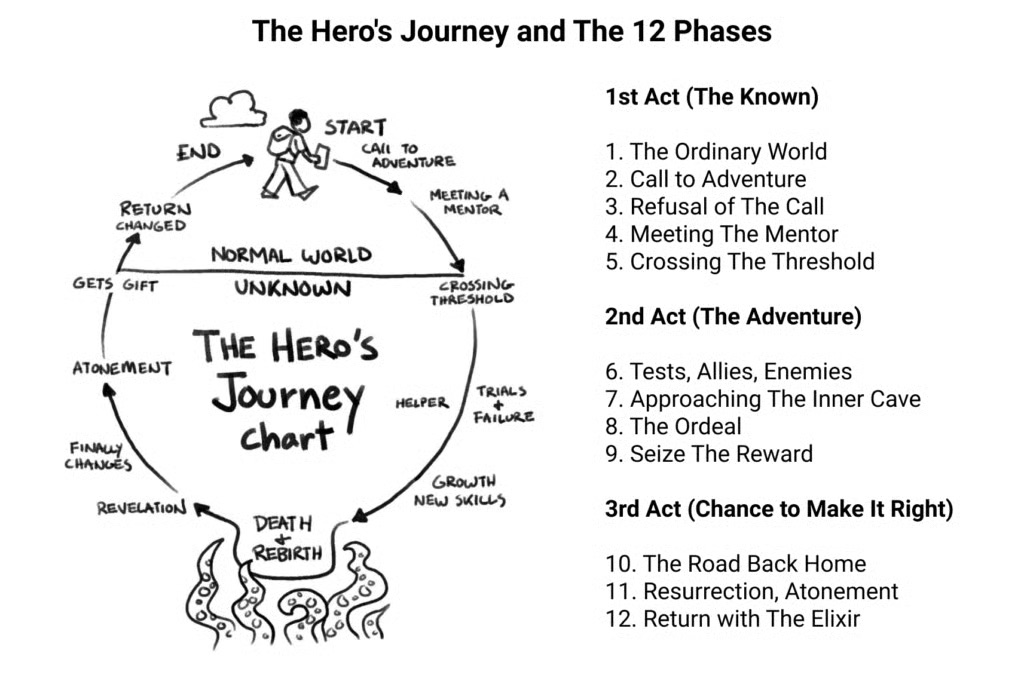
Fig 4: Image of Joseph Campbell’s Hero’s Journey Sourced From worldbuilders.ai
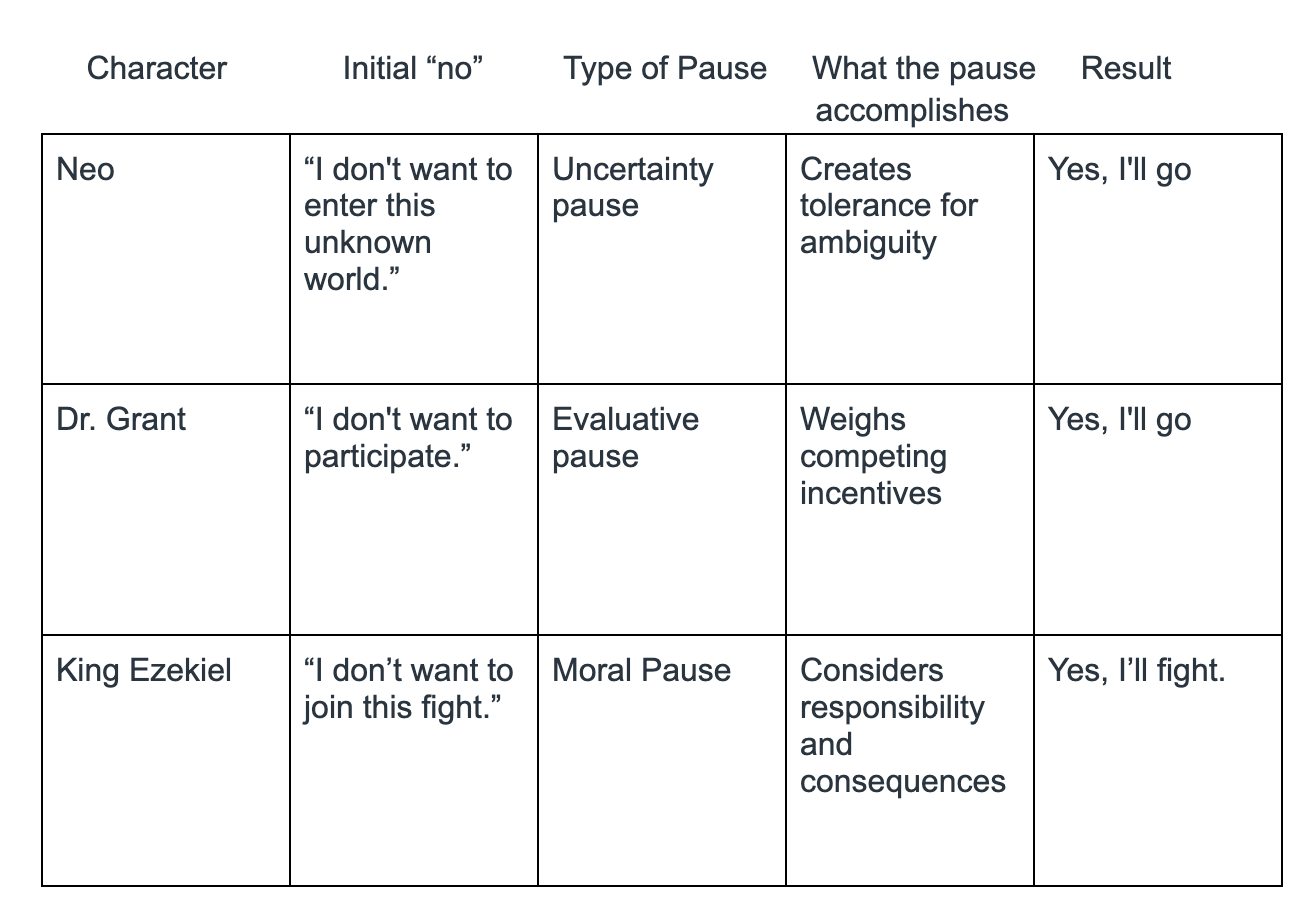
Because humans are naturally storytellers in all that we do, incorporating the steps in a hero’s journey is also useful for marketing to a target audience. In designing a website, considering a buyer’s (the hero) refusal to the call could look like addressing the fear of financial risk from a potential buyer through the use of free trials or using customer reviews for social proof that your business is worth paying for.
Pause In the Movement
Designing for emotions requires thinking about how viewers will remember the film later (Lupton, 2017). We’ve explored some narrative pauses for visual storytelling, but there are also pauses in movement that a filmmaker may place for emotional impact that lasts. These pauses can look like:
- Held shots: The camera lingering on a landscape, an empty room, or a character’s face after the action ends all give viewers time to feel what just happened.
- Silence: Music or dialogue pausing right before or after a significant moment lets the audience feel the weight of it.
- Reaction shots: The camera stays on a character listening to or absorbing news rather than cutting to the next plot point.
- Rituals and routine: moments like making tea, packing a bag, or looking back at their home before leaving. These slow down the movement in cinema while tapping into our sense of multisensory design by experiencing the film with data we already know about the environment (Lupton, 2017, p. 142, Module 4). We can all recall sensations, like smell and emotion, during our own rituals and routines, making our connection to what we’re watching on the screen more meaningful.
- Cutaways to memory or imagination: even though this is a pause in the storyline, it creates the context we need to understand the plot better.
Fig 5: Clip from Tokyo Story (0:18:06-0:19:36), directed by Y. Ozu (1953), Shochiku. Copyright 1953 by Shochiku.
Japanese filmmaker Yasujirō Ozu is a classic example of a visual storyteller who incorporates all of these pauses in his work regularly. In the 1953 film, Tokyo Story, there’s a scene where adults are sitting on the floor of a room, fanning themselves and talking (Ozu, 1953). At the end of the conversation, the younger adults leave, and there’s a moment when they linger on the elders fanning themselves in silence before cutting to the next scene. Culturally, the connection it made for me is my grandparents rocking in their chairs on their porch in mostly silence unless someone walks by for a quick chat. The texture of a shared lived experience was portrayed simply by savoring a moment instead of immediately moving from one scene to the next.
“Trying to create usable interfaces is a bit like a chef trying to create edible foods.” (Freddusya, 2012)

Fig 6: Restaurant and Tech Image via restroworks.com
Much like when you visit a new restaurant, you’re looking for an incredibly seamless experience when navigating a user interface. The ingredients a designer must balance are utility, usability, and aesthetics. Usability doesn’t always mean fast; sometimes, the choices that make a design usable intentionally slow us down. We often think of navigating an interface as a frictionless experience, but there are times when the designed pause is not just necessary, it is welcomed.
This is where friction becomes strength instead of a flaw. In the same way that a good dining experience may include moments of waiting or anticipation, a well-designed interface can intentionally incorporate designed pauses when doing so serves a purpose. A pause can give users time to perceive information and consider their options, confirm an action, or simply remain oriented within an experience.
Rather than viewing every interruption as a barrier to usability, designers can treat certain moments of friction as opportunities to support the user. The question we should be asking isn’t whether an interface should be frictionless, but whether the friction has been intentionally designed. The goal of good interface design is not to eliminate friction but to distinguish between unnecessary friction and meaningful pause.
The Designed Pause in Calm Technology
One example of this intentional pause can be found in the use of Calm Technology. Taking the time to slowly introduce new features so that a user gets a chance to get used to a product is one of the principles of Calm Technology coined by Mark Weiser and Seely Brown. Their idea is that technology should inform us without constantly demanding our attention. “The goal of Calm Technology is to make technology work for people, rather than the other way around” (Hassan et al., 2024).
An article from Simply Psychology explains that perception isn’t simply “seeing” information; the brain selects, organizes, interprets, and contextualizes sensory information (McLeod, 2026). Both of these principles ultimately talk about how humans allocate attention and make sense of information.
The designed pause is a concept that is intentionally used in calm technology across mediums. Within Calm Technology, a designed pause can be understood as an intentional moment in which technology reduces the demand placed on a user’s attention. Rather than interrupting the user and immediately requiring a response, the technology provides enough information for the user to notice, perceive, and interpret what is happening before deciding whether further attention or action is necessary. The pause therefore creates a transition between peripheral awareness and focused attention. In this sense, a designed pause is not an absence of interaction but a deliberate space that gives users greater control over when and how they engage with technology.
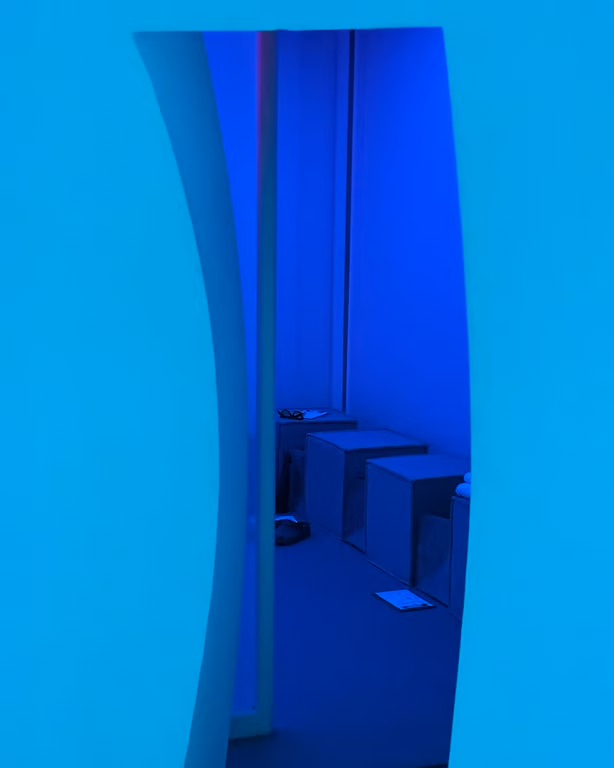
Fig 7: Interior of Chromasonic
via nearfuturelaboratory.com
One of the 8 principles of Calm Technology, summarized by anthropologist and researcher of humans and technology Amber Case, is that technology should work even when it fails (Case, n.d.). An example of this is when there is a lapse in internet connection, an unintentional pause, the interface designs the pause by providing safe backups and greying out the wifi symbol instead of a distracting “no connection” announcement. Without the use of this principle, losing connection would cause a lot of necessary panic and anxiety.
While You Wait
Research on consumer responses to waiting suggests that the experience of delay is not inherently negative; rather, consumers’ evaluations can depend on how the waiting experience is perceived and framed (Dellaert & Kahn, 1999). For longer wait times, a designer would want to provide more information in order to reduce the risk of a user having anxiety and leaving the website. The types of information used are duration and countdown information, which is how long the wait is and how much of the website has been downloaded consecutively.

Fig 8: Speed Via mentaexperts.com
For shorter wait times, a designer could implement a skeleton screen, which is a modern wireframe-like tool developed in response to the Doherty Threshold. The Doherty Threshold was developed from a 1982 research paper in the IBM Systems Journal by Walter J. Doherty and Ahrvind J. Thadani. It set the standard for computer response time to be within 400 milliseconds (Laws of UX, n.d.).
A skeleton screen is a loading state built into the interface that gives the user visual cues that the site is being worked on. It appears as grey placemaker shapes that preview what’s to come; it’s the designed space before the request is completed. These cues reduce the perception of waiting, which keeps users engaged.
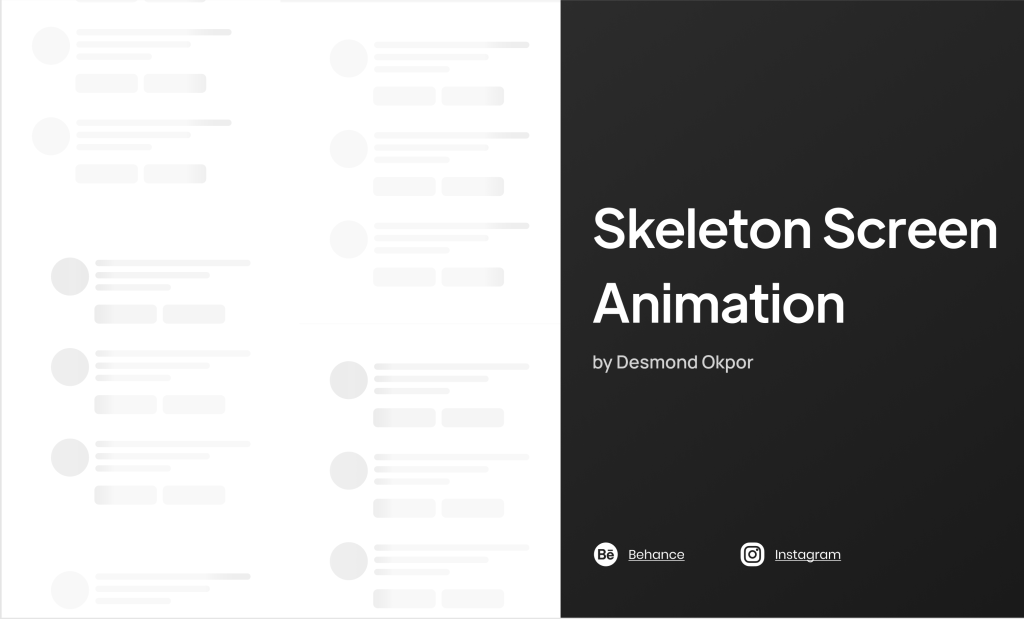
Fig 9: Skeleton Screen Preview by Desmond Okpar via figma.com
The Sensory Pause
Just as visual whitespace gives the eye room to process information, brief pauses between haptic signals, like the vibration from a confirmed Apple Pay payment, gives the body time to understand whether a payment went through. Meta’s current haptic design guidance recommends using short pauses (silence/space) between haptic feedback to give our fingers a chance to rest and subsequent sensations have greater impact (Meta, 2026).
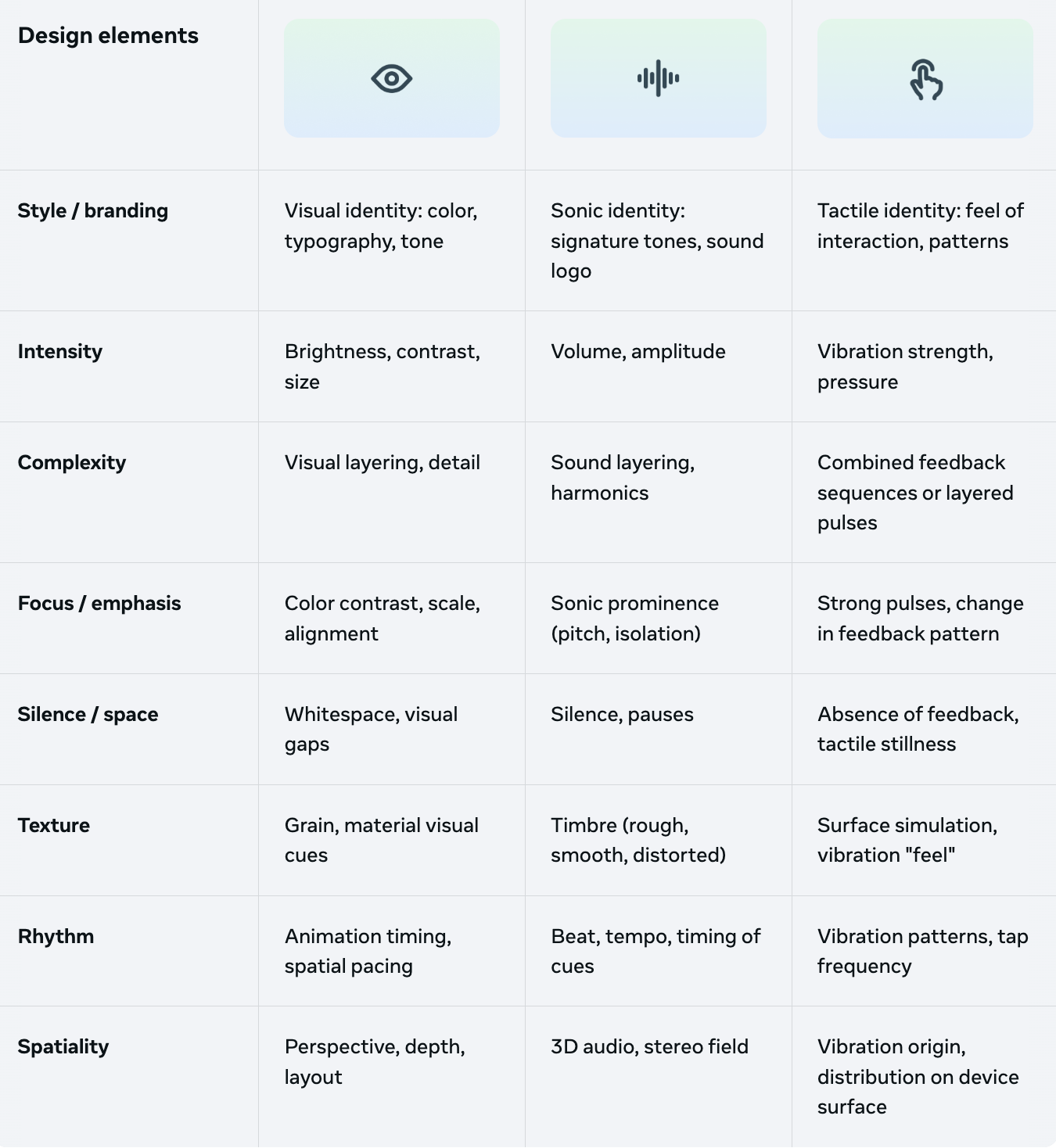
Fig 10: Design elements of Haptics for the user experience via Meta
Multisensory design illustrates that an effective interface does not necessarily maximize sensory input at every moment. Instead, designers can create rhythm by alternating between stimulation and stillness. “Haptic memory is the sensory memory that helps people identify, remember, and interact with objects through touch” (Astriata, 2024). A brief pause between visual, auditory, or haptic cues can give users time to process what they have experienced before moving forward. The pause, therefore, becomes an active component of the interface and one that supports comprehension rather than disrupting it.
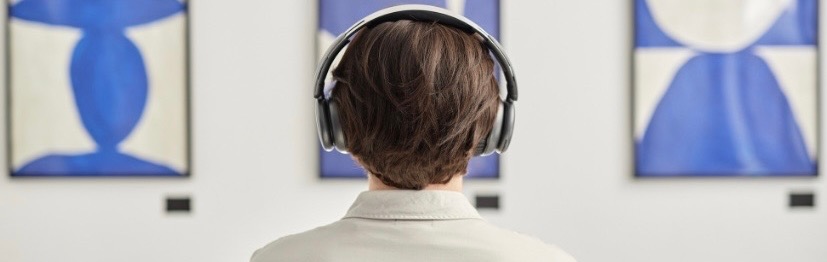
Gestalt Principles
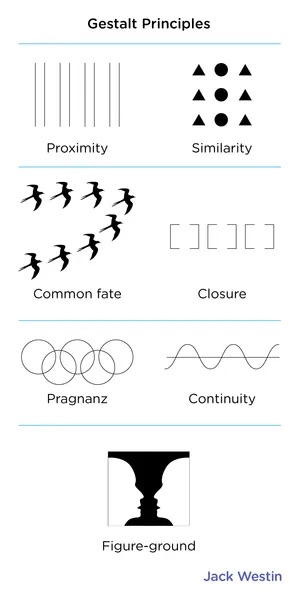
Fig 11: Gestalt Principles
via JackWestin.com
Gestalt principles are the laws that describe how people naturally organize perceptual information, and the designed pause examines how designers can intentionally create moments that influence that process. Through these principles, designers can plan for not only what users perceive but also when they are encouraged to pause and continue.
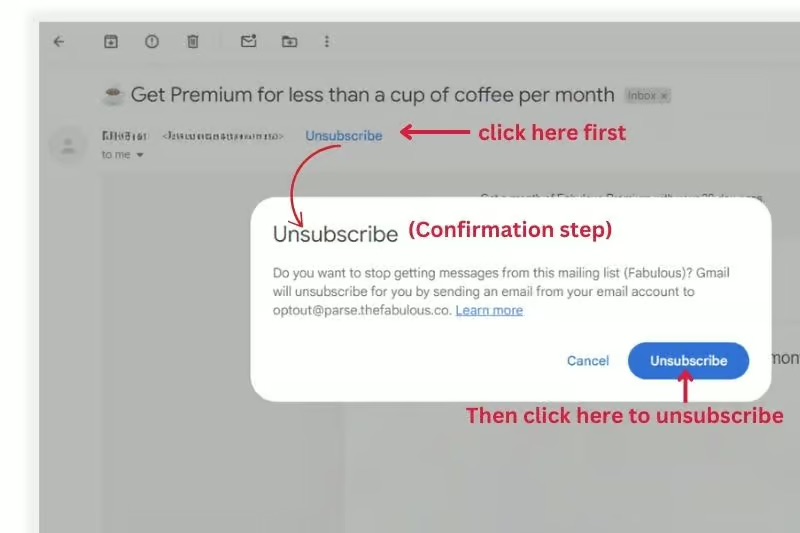
Fig 12: Confirm unsubscribe
via inboxally.com
The designed pause can function as a moment of figure-ground separation, giving the user space to distinguish what deserves attention from what can fade into the background. Rather than filling the screen or every moment with information, designers can use space, silence, or reduced visual stimulation to establish a clear perceptual figure.
An example of this would be as a user attempts to unsubscribe from an email. The “We’re sorry to see you go” to confirm unsubscribing prompt demonstrates how figure-ground can support a designed pause.
By placing the confirmation message in a visually pronounced layer while blurring the surrounding interface, the design shifts the user’s attention toward the decision at hand. The pause creates a moment between intention and action in which the user can reconsider the consequences of continuing. The moment of friction gives the user an opportunity to reevaluate whether they truly want to take an action before committing to it.
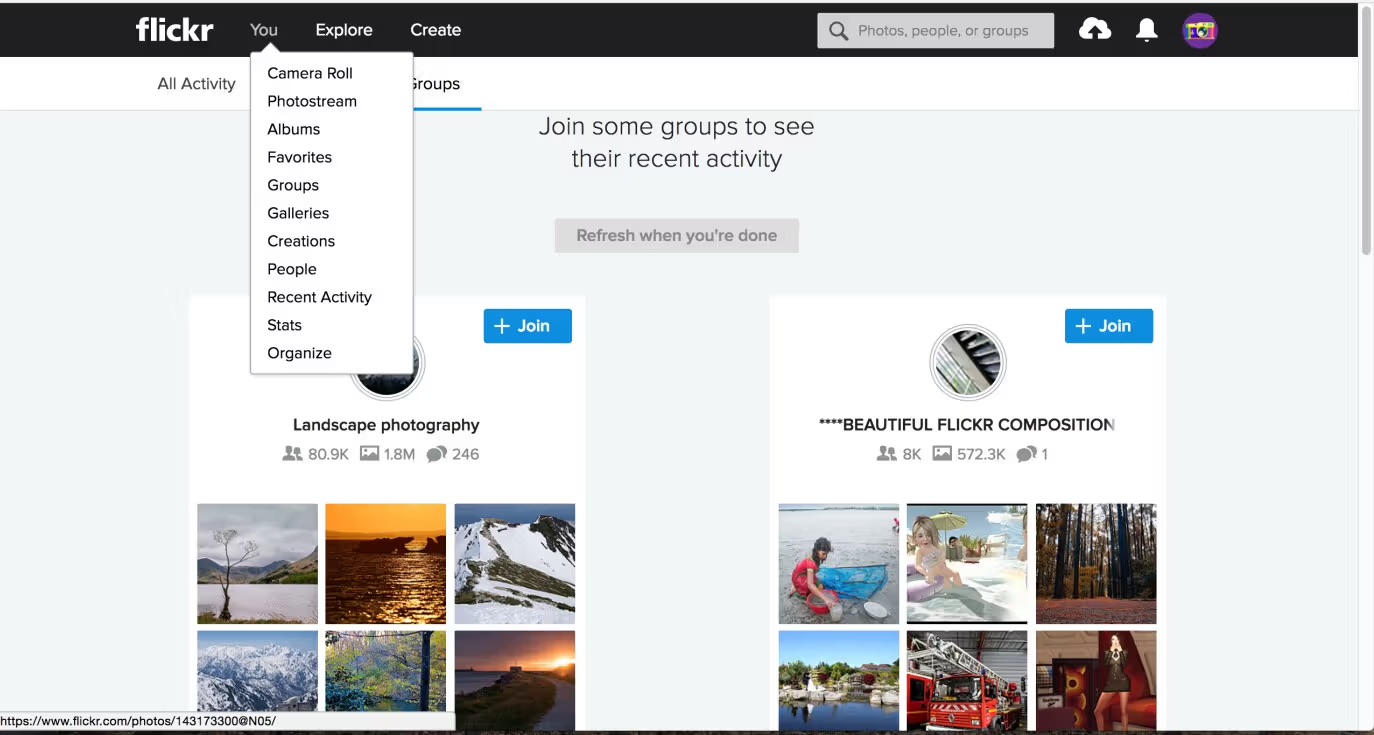
Fig 13: Hover Menu on Flickr
via ixdf.org
Gestalt’s law of continuation explains how we tend to follow lines, patterns, or sequences that appear continuous (Nielsen Norman Group, 2023). But a pause doesn’t necessarily interrupt continuity; it can actually guide a user through it. Hovering over an interactive element to preview information creates a small interruption while still maintaining the user’s path through the interface and staying true to the law of continuity. This sequence allows users to preview information on what navigations they can take before continuing along a path.
A Pause is Directional
In all of these examples, from film to user interfaces, the common thread is that a designed pause is directional. Rather than simply stopping an experience, it provides the contextual framing, space, and clarity needed for whatever comes next.
In 2022, POWERADE launched its “Pause Is Power” campaign, which centers around taking well-intended pauses in order to come back stronger. WebWire published an article after the launch of the campaign stating, “”Pause is Power” challenges the “win at all costs” mentality associated with modern sports culture by portraying the pause—a moment of laughter, reflection, community, and recovery—as an act of humanity with regenerative benefits” (WebWire, 2022).
In this context, the pause is not a disruption of the game; it is what allows the athlete to recover, recalibrate, and return with renewed strength.
Fig 14: Video frame of Simone Biles for
Powerade’s “Pause is Power” Campaign.
Bibliography
Astriata. (2024, October 17). How multi-sensory web design can improve the user experience. (Module 4) https://astriata.com/how-multi-sensory-web-design-improves-user-experience/
Case, A. (n.d.). Calm technology. Calmtech.com. Retrieved October 4, 2026, from https://calmtech.com/
Chepinchikj, N., & Thompson, C. (2016). Analyzing cinematic discourse using conversation analysis. Discourse, Context & Media, 14, 40–53. https://doi.org/10.1016/j.dcm.2016.09.001
Dellaert, B. G. C., & Kahn, B. E. (1999). How tolerable is delay? Consumers’ evaluations of internet websites after waiting. Journal of Interactive Marketing, 13(1), 41–54. https://www.sciencedirect.com/science/article/pii/S1094996899702252
Laws of UX. (n.d.). Doherty threshold. https://lawsofux.com/doherty-threshold/
Lupton, E. (2017). Design is storytelling. Cooper Hewitt, Smithsonian Design Museum. “Hero’s Journey” (p. 26, Module 2), “Refusal of the Call” (p. 27, Module 2), “Designing For Emotion” (p. 59, Module 3), “Multisensory Design” (p. 142, Module 4)
Flanagan, M. (2012). ‘Slow cinema’: Temporality and style in contemporary art and experimental film [Doctoral thesis, University of Exeter]. Open Research Exeter. https://ore.exeter.ac.uk/repository/handle/10036/4432
Freddusya. (2012, April 12). Designing For Emotion (Aarron Walter) [Video]. YouTube. https://www.youtube.com/watch?v=ks91vBm3oT8 (Module 3)
Hassan, A. H. S., El-Rify, J. H. W., & Attia, M. A. (2024). Calm technology: A new concept for interactive advertising design. Journal of Art, Design and Music, 3(1), Article 5. DOI:10.55554/2785-9649.1026
McLeod, S. (2026, September 25). Visual perception theory in psychology. Simply Psychology. https://www.simplypsychology.org/perception-theories.html (Module 4)
Mejtoft, T., Långström, A., & Söderström, U. (2018). The effect of skeleton screens: Users’ perception of speed and ease of navigation. In Proceedings of the 36th European Conference on Cognitive Ergonomics (Article 22). Association for Computing Machinery. DOI:10.1145/3232078.3232086
Meta. (2026, May 5). Haptics: Best practices. Meta Horizon OS Developers. https://developers.meta.com/vr/design/haptics-best-practices/
Nielsen Norman Group. (2023, February 3). Continuation: Gestalt principle for user interface design [Video]. YouTube. https://www.youtube.com/watch?v=WiexyctjCms
Ozu, Y. (Director). (1953). Tokyo story [Film]. Shochiku.
WebWire. (2022, March 14). Pause is power: POWERADE challenges the “win at all costs” mindset with a new global campaign. https://www.webwire.com/ViewPressRel.asp?aId=286530
Figure Sources
Figure 1. Sam Neill as Dr. Alan Grant in Jurassic Park (1993), Source: https://www.imdb.com/title/tt0107290/mediaviewer/rm2805058560/
Figure 2. Fig 2: Keanu Reeves as Neo in The Matrix (1999) Source: https://www.pinterest.com/pin/458311699595327932/
Figure 3. Khary Payton as King Ezekiel in the Walking Dead (2010), Source: https://www.the-independent.com/arts-entertainment/tv/news/the-walking-dead-season-7-king-ezekiel-actor-khary-payton-tiger-fake-a7388561.html
Figure 4. Fig 4: Image of Joseph Campbell’s Hero’s Journey (2022), Source: https://www.worldbuilders.ai/p/psychology-heros-journey
Figure 5. Clip from Tokyo Story (0:18:06-0:19:36), directed by Y. Ozu (1953), Shochiku. Copyright 1953 by Shochiku.
Figure 6. Restaurant and Tech Image via Restro Works Blog (2024) Source: https://www.restroworks.com/blog/the-future-of-restaurant-technology-trends-and-predictions-for-2025/
Figure 7. Interior of Chromasonic via Nearfuturelaboratory (2025), Source: https://nearfuturelaboratory.com/blog/2025/07/designing-calm-technology/
Figure 8. Speed Via mentaexperts.com (2024), Source: https://mentaexperts.com/blog/the-doherty-threshold-how-to-optimize-performance-and-responsiveness-in-web-design/
Figure 9. Skeleton Screen Preview by Desmond Okpar via figma.com (n.d) Source: https://www.figma.com/design/c27bZMCo9gqWuC5IIkigIY/Skeleton-Screen-Animation–Community-?node-id=2-86&p=f&t=WPgsiXYyScD0xSJm-0
Figure 10. Design elements of Haptics for the user experience via Meta (2026, May 5). Haptics: Best practices. Meta Horizon OS Developers. Source: https://developers.meta.com/vr/design/haptics-best-practices/
Figure 11. Gestalt Principles via Jack Westin (n.d), Source: https://jackwestin.com/resources/mcat-content/perception/gestalt-principles
Figure 12. Confirm unsubscribe via Inbox Ally (2024), Source: https://www.inboxally.com/blog/one-click-unsubscribe
Figure 13. Hover Menu on FLKR via ixdf.org (2020) Source: https://ixdf.org/literature/article/display-contents-the-classic-way-with-dropdown-menu
Figure 14. Still Frame of Simone Biles for Powerade’s “Pause is Power” Campaign (1993), Source: https://www.youtube.com/watch?v=YCQaZQ7W6bQ